💬 Monitor your websites using GET/POST/HEAD requests, verify SSL certificates, and check for specific content — all configured via a simple YAML file.
Get instant Telegram alerts after N failures and a recovery notification when the site is back online.
No cloud. No lock-in. No Docker. Just Python + crontab.
- ✅ Runs anywhere — no Docker or containers needed
- ✅ No third-party APIs or subscriptions
- ✅ Full control, full privacy
- Internal tools & dashboards
- APIs that shouldn’t go unnoticed
- Low-cost uptime monitoring (no external services)
- 🔁 HTTP Methods: GET, POST, HEAD
- 🔐 SSL Certificate Expiry Checks
- 🧠 Content Validation:
- ✅ search_string: Verify a specific string is present in the response
- ❌ absent_string: Verify a specific string is absent in the response
- 🛠️ Custom Headers & POST data
- 🕒 Flexible Cron Scheduling per site
- 💬 Telegram Alerts on errors & recovery
- 📊 Summary Reports: one consolidated scheduled Telegram report of all services that are still down
- ⚙️ YAML-Based Config — easy to read, edit, and version
- 🖥️ Shell Command Monitoring: Run any command and validate its output
- 🧪 Debug/Test Modes to simplify setup
Spin up your own uptime monitor with Telegram alerts in just a few steps:
git clone https://github.com/pohape/self-hosted-tg-alerts-uptime-monitor
cd self-hosted-tg-alerts-uptime-monitor
python3 -m venv venv
source venv/bin/activate
pip install -r requirements.txt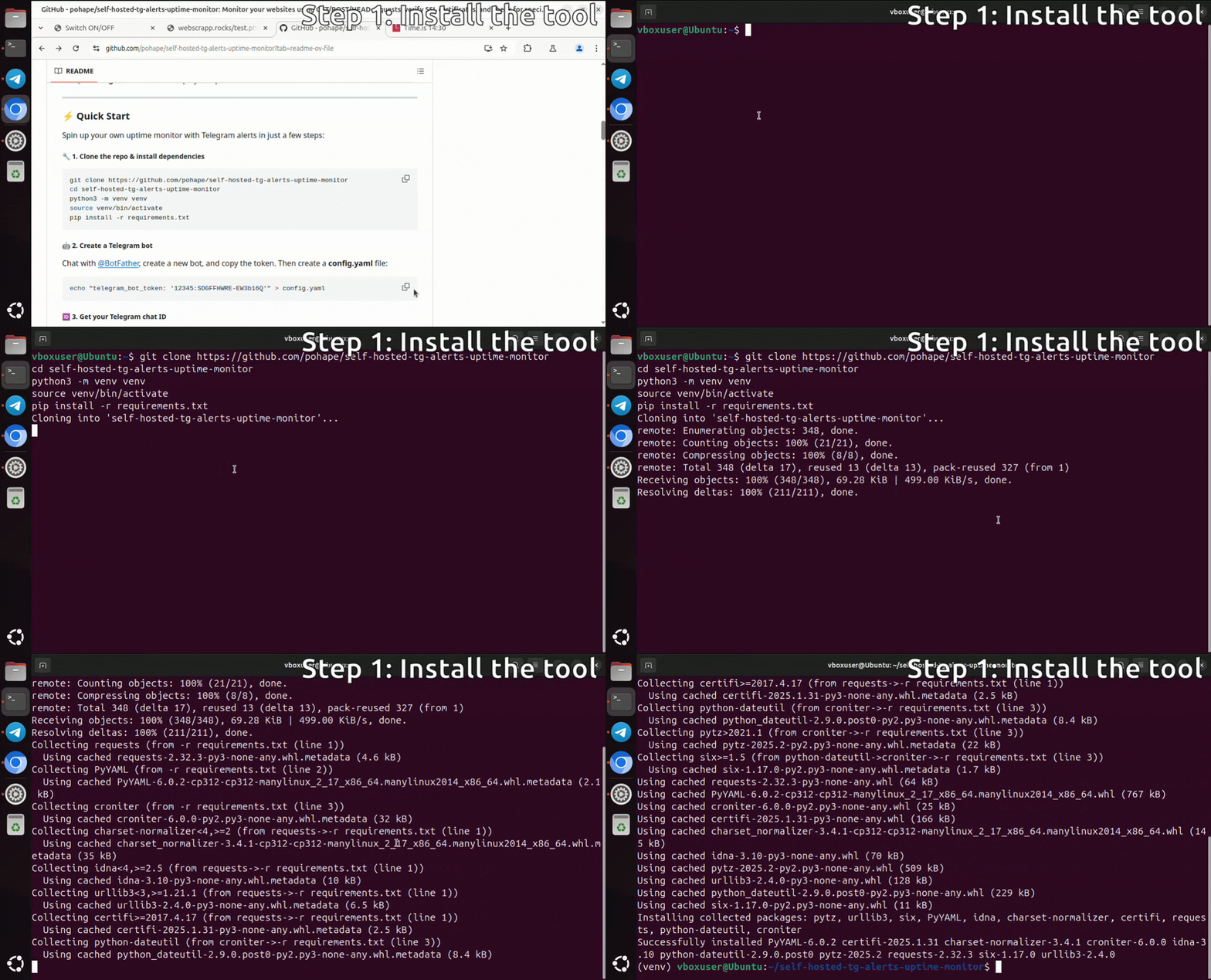
Chat with @BotFather, create a new bot, and copy the token.
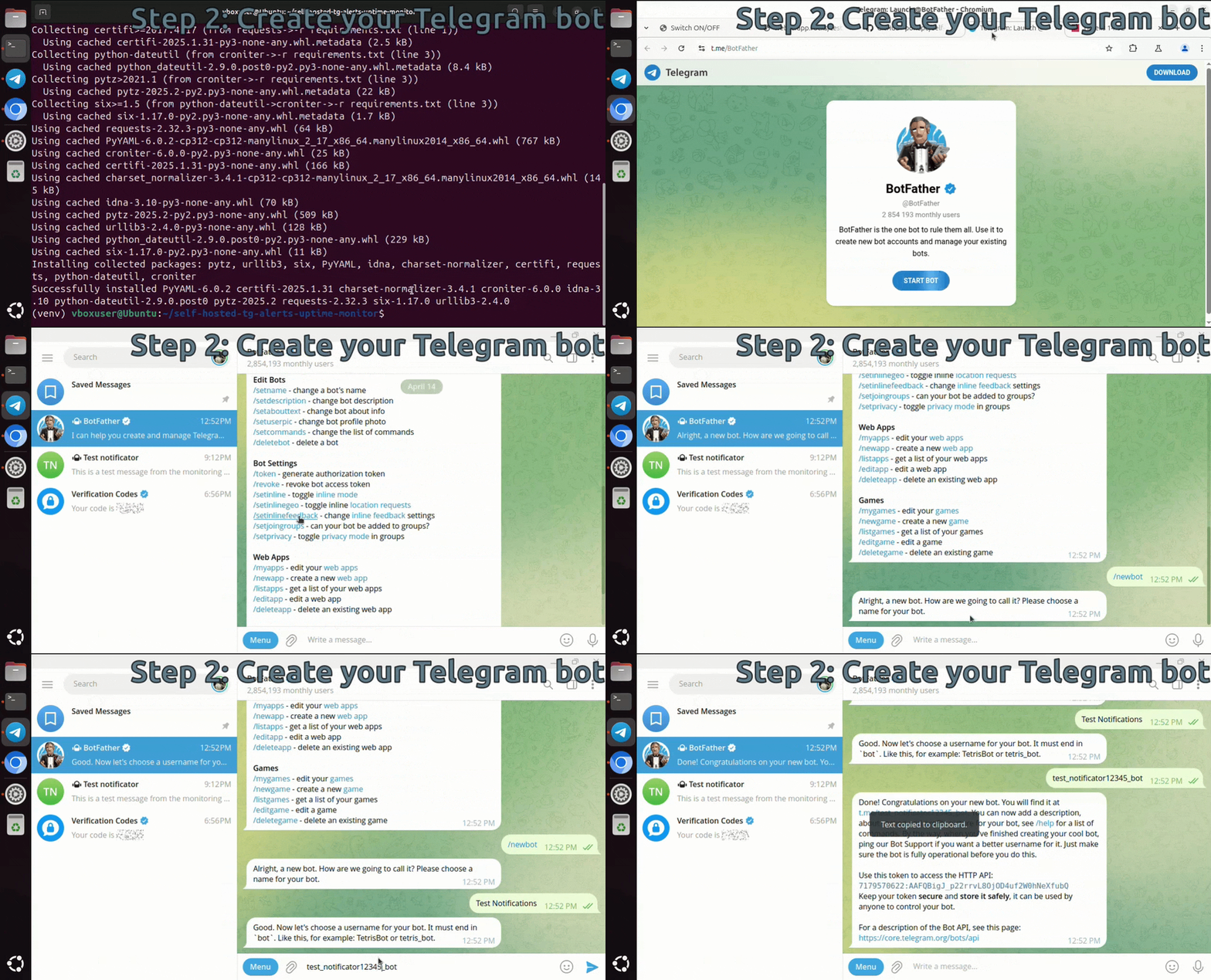
Initialize your config.yaml with your Telegram bot token:
echo "telegram_bot_token: '12345:SDGFFHWRE-EW3b16Q'" > config.yaml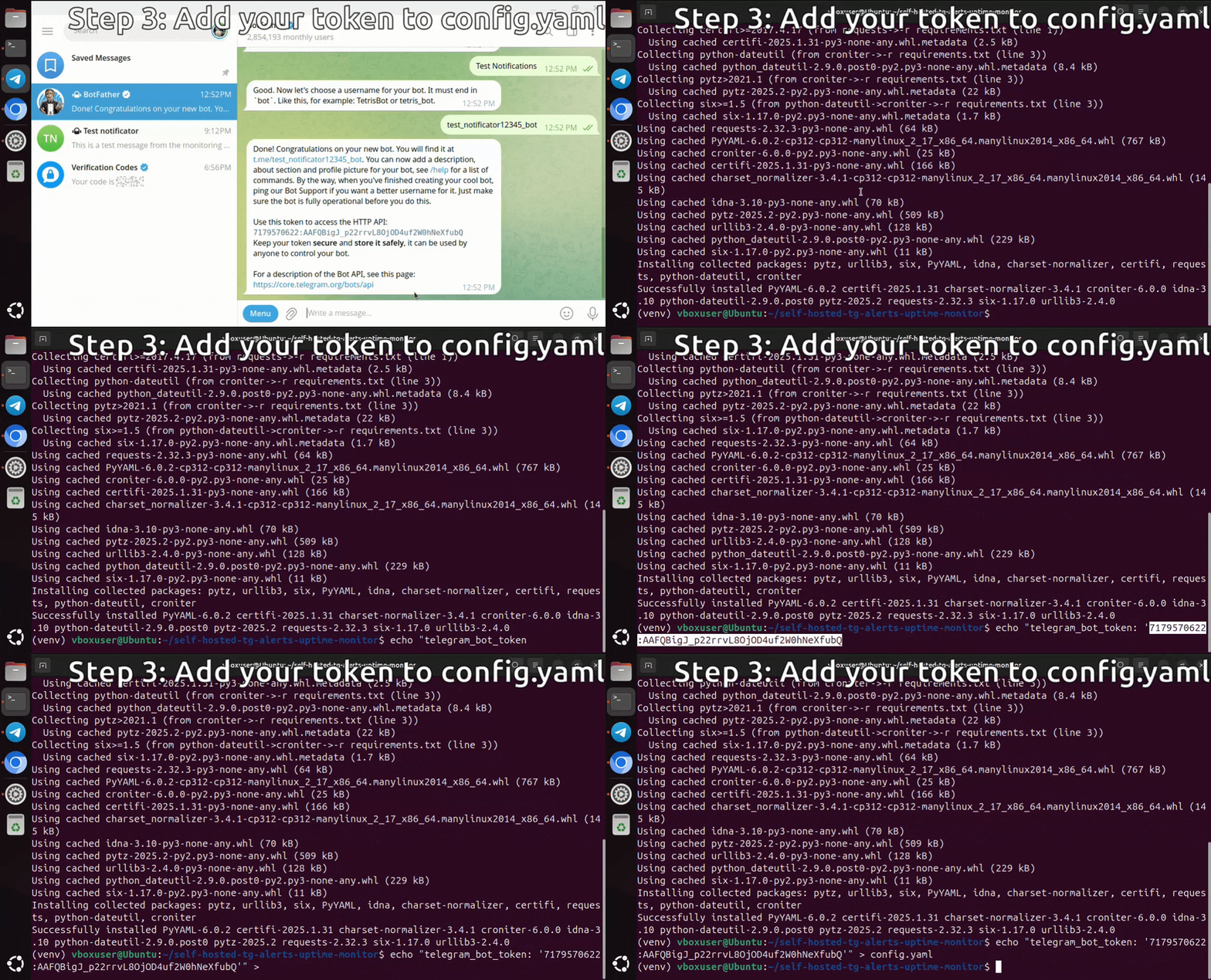
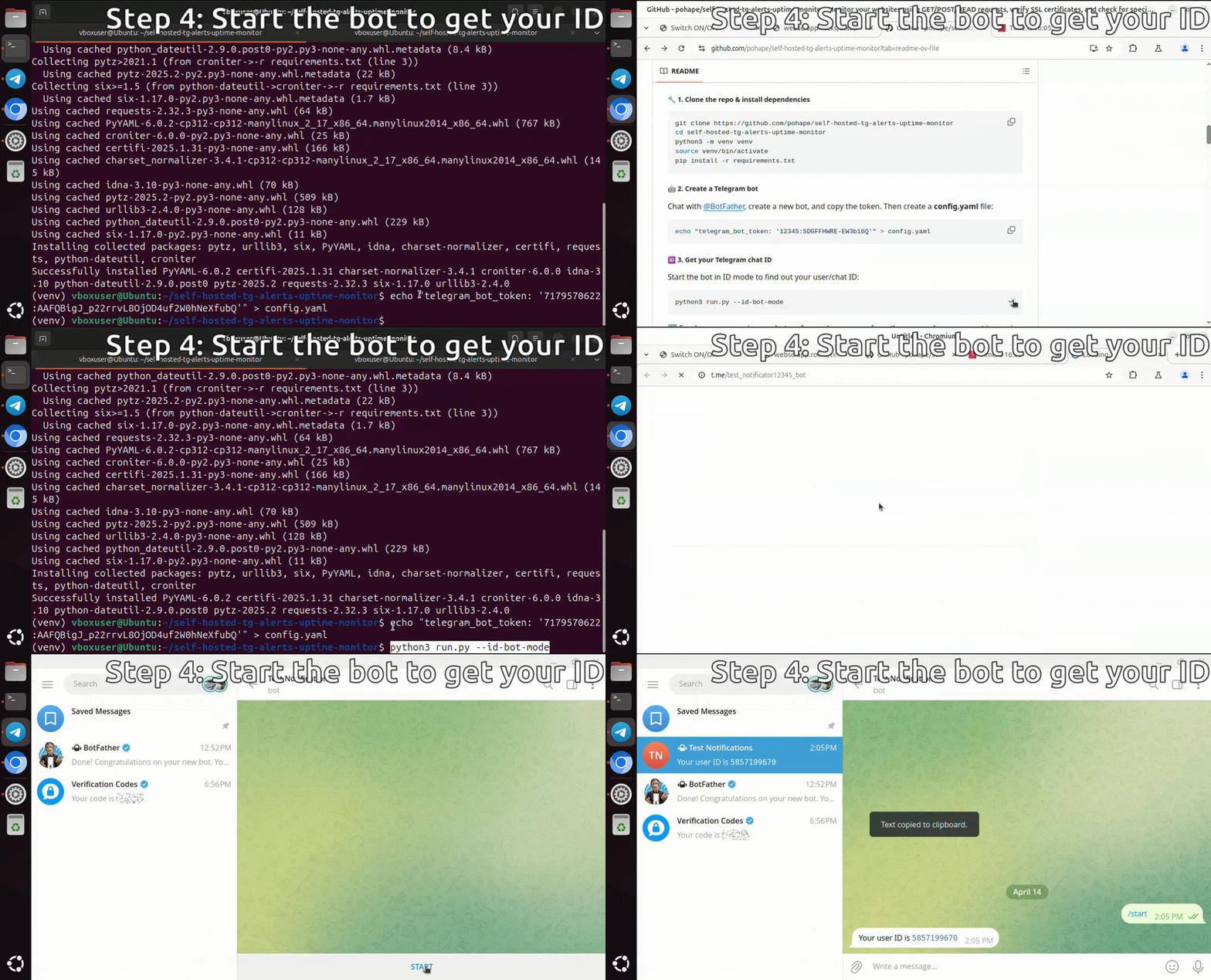
Start the bot in ID mode to find out your user/chat ID:
python3 run.py --id-bot-mode➡️ Send any message to your bot, or forward a message from the group where you want to receive notifications.
🛠️ If you want to receive notifications in a group, make sure the bot has been added to that group.
Edit config.yaml and define your site(s):
telegram_bot_token: 'YOUR_BOT_TOKEN_HERE'

sites:
  homepage:
    url: "https://example.com"
    search_string: "Example Domain"
    tg_chats_to_notify:
      - '123456789'  # your Telegram user or chat ID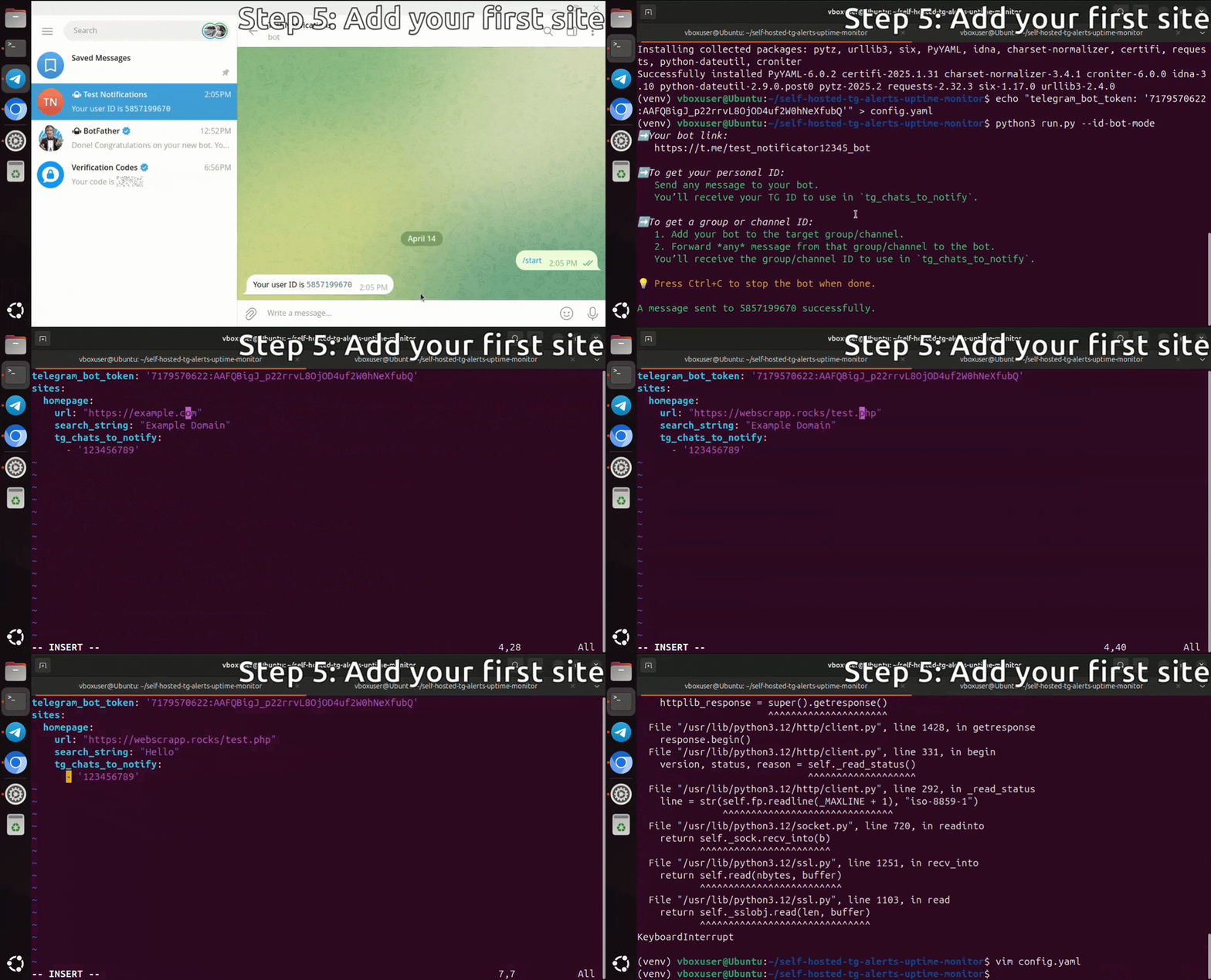
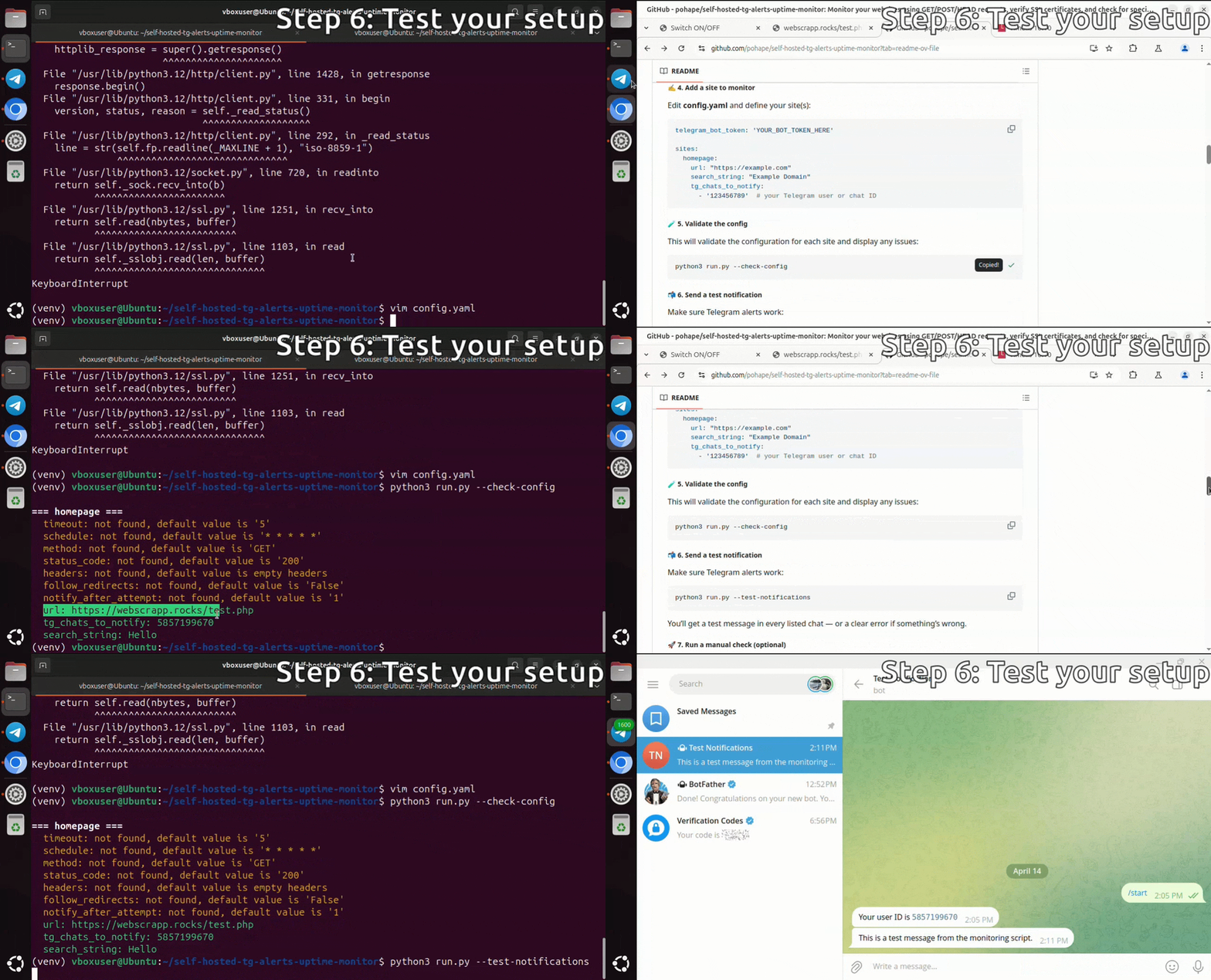
This will validate the configuration for each site and display any issues:
python3 run.py --check-configMake sure Telegram alerts work:
python3 run.py --test-notificationsYou’ll get a test message in every listed chat — or a clear error if something’s wrong.
Force a one-time check of all sites:
python3 run.py --force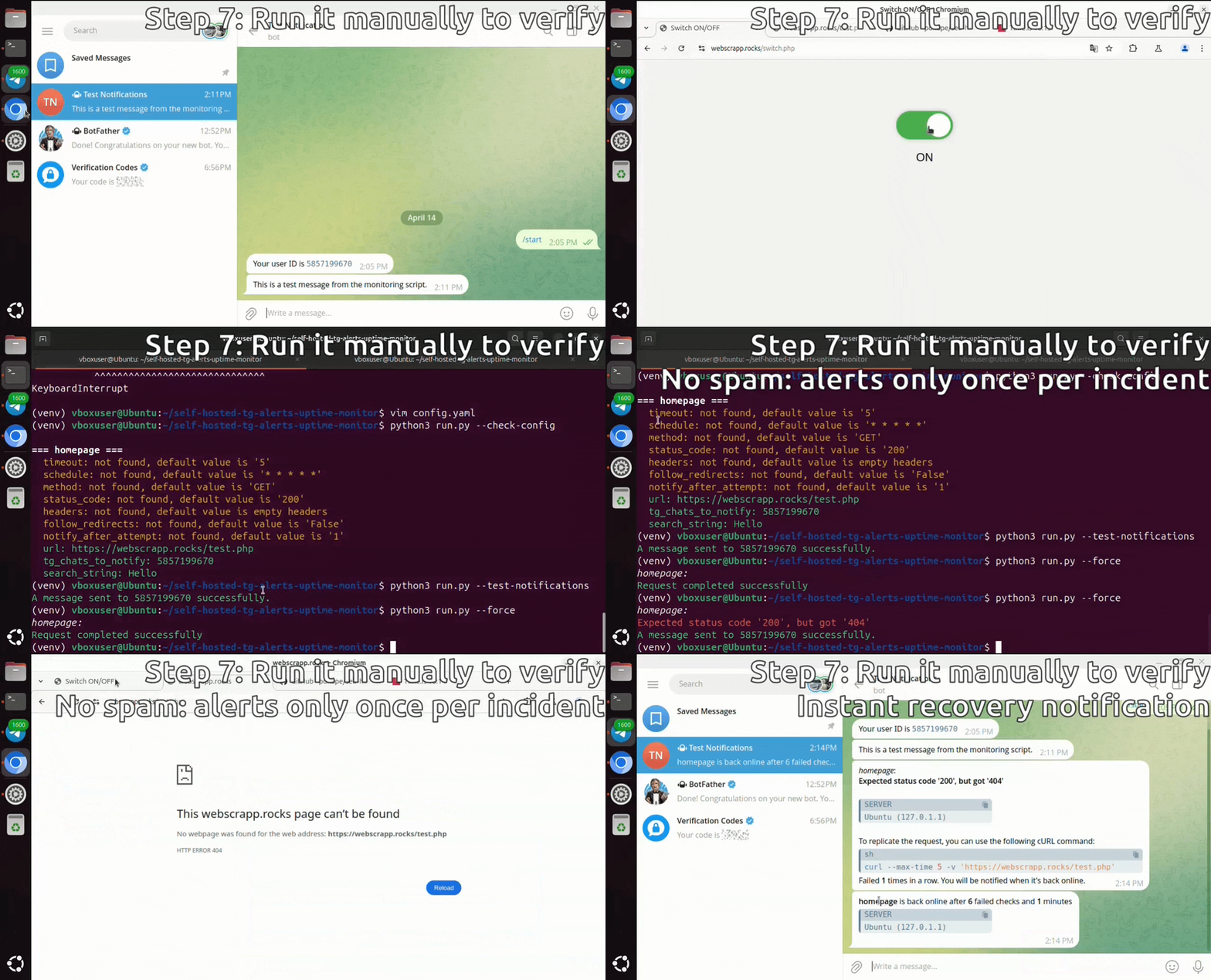
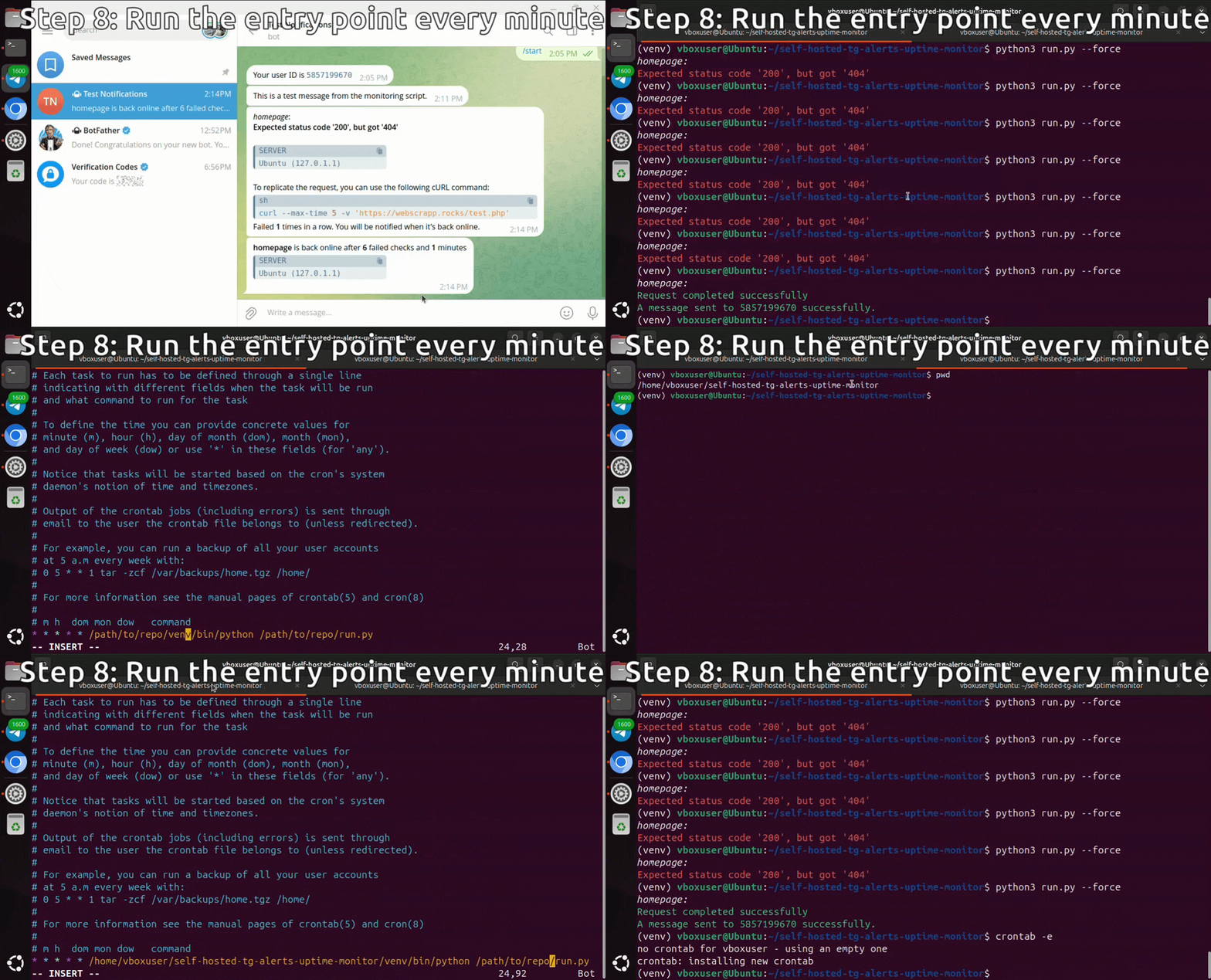
Enter your crontab:
crontab -eThen add this line (replace /path/to/repo with the actual path to your cloned project):
* * * * * /path/to/repo/venv/bin/python /path/to/repo/run.py📅 The entry point runs every minute, but each site is checked according to its own schedule, defined in the config.yaml using cron syntax
python3 run.pypython3 run.py --test-notificationspython3 run.py --id-bot-modepython3 run.py --forceExample results:
+ Request to home_page completed successfully.

- Error for not_found: Expected status code '404', but got '200'
+ A message with the error sent to 5487855 successfullypython3 run.py --check-configExample results:
@@ home_page @@
!  timeout: not found, default value is '5'
!  status_code: not found, default value is '200'
!  schedule: not found, default value is '* * * * *'
+  url: https://example.com/
+  tg_chats_to_notify: 5487855
+  notify_after_attempt: 3  # Notify only after 3 failed checks in a row
+  method: GET
+  search_string: ENGLISH

@@ not_found @@
-  schedule: invalid cron syntax: '2 * * * '
+  url: https://example.com/qwerty
+  tg_chats_to_notify: -1831467, 5487855
+  timeout: 5
+  method: HEAD
+ status_code: 404The configuration is done through the config.yaml file. Below is an example configuration:
# Your Telegram Bot Token
telegram_bot_token: 'YOUR_TELEGRAM_BOT_TOKEN'
+summary_schedule: '0 17 * * *'  # (optional) daily summary at 17:00 if at least one site is down

sites:
  # 1. GET request to the main page where we look for "<body>"
  #    - No timeout specified (default is 5 seconds)
  #    - No method specified (default is GET)
  main_page_check:
    url: "https://example.com/"
    follow_redirects: True # Redirects are not followed by default
    search_string: "<body>"
    absent_string: "Not Found"
    # Notifications will be sent to the frontend group
    tg_chats_to_notify:
      - '1234567890'  # frontend group ID
    # Schedule: every minute (default)

  # 2. Explicit GET request to a non-existent page, expecting 404 and "Not Found"
  not_found_page_check:
    url: "https://example.com/nonexistent-page"
    follow_redirects: False # Redirects are not followed by default, making this the same as the default behavior.
    method: "GET"
    status_code: 404
    search_string: "Not Found"
    timeout: 2  # 2 seconds timeout
    # Notifications will be sent to the backend group
    tg_chats_to_notify:
      - '2345678901'  # backend group ID
    # Schedule: every 5 minutes
    schedule: '*/5 * * * *'  # Every 5 minutes

  # 3. POST request to the API with authorization and Content-Type JSON, expecting status_code = 201
  api_post_check:
    url: "https://example.com/api/endpoint"
    method: "POST"
    headers:
      Content-Type: 'application/json'
      Authorization: 'Bearer YOUR_API_TOKEN'
    post_data: '{"key": "value"}'
    status_code: 201
    timeout: 3  # 3 seconds timeout
    # Notifications will be sent to the API group and to the backend group
    tg_chats_to_notify:
      - '3456789012'  # API group ID
      - '2345678901'  # Backend group ID
    # Schedule: every 15 minutes
    schedule: '*/15 * * * *'  # Every 15 minutes

  # 4. Sending a contact form through POST request, as browsers typically do by default
  feedback_form_submission:
    url: "https://example.com/contact"
    method: "POST"
    headers:
      Content-Type: 'application/x-www-form-urlencoded'
    post_data: "name=John+Doe&email=john.doe%40example.com&message=Hello+World"
    status_code: 200
    search_string: "Thank you for your message"
    timeout: 2  # 2 seconds timeout
    # Notifications will be sent to the frontend group
    tg_chats_to_notify:
      - '1234567890'  # frontend group ID
    # Schedule: every day at midnight
    schedule: '0 0 * * *'  # Every day at 00:00

  # 5. HEAD request to privacy_policy.pdf to check resource availability
  privacy_policy_check:
    url: "https://example.com/privacy_policy.pdf"
    method: "HEAD"
    # Notifications will be sent to the backend group
    tg_chats_to_notify:
      - '2345678901'  # backend group ID
    # Schedule: every hour
    schedule: '0 * * * *'  # Every hour at 00 minutes
    # No timeout specified (default is 5 seconds)

  # 6. Monitor ChatGPT API balance availability (one check costs ~$0.000001275)
  chat_gpt_balance_check:
    url: "https://api.openai.com/v1/chat/completions"
    method: "POST"
    headers:
      Content-Type: 'application/json'
      Authorization: 'Bearer YOUR_OPENAI_API_KEY'
    post_data: '{"model": "gpt-4o-mini", "messages": [{"role": "user", "content": "Ping"}], "max_tokens": 1}'
    status_code: 200
    search_string: 'prompt_tokens'
    schedule: '0 * * * *'  # Every hour at 00 minutes
    tg_chats_to_notify:
- '2345678999' # infrastructure manager ID- telegram_bot_token: Your Telegram bot token obtained from @BotFather.
- summary_schedule (optional): Cron expression that defines when a consolidated downtime summary should be sent. A message is generated only if at least one monitored service is still failing at that moment.
- sites: A list of sites to monitor.
- url: The URL of the site to monitor.
- follow_redirects: (optional, default is False): Whether to follow HTTP redirects during the request.
- method (optional, default is GET): The HTTP method to use (GET, POST, HEAD).
- headers (optional): A dictionary of HTTP headers to include in the request.
- post_data (optional): Only for the POST method.
- status_code (optional, default is 200): An expected HTTP status code.
- search_string (optional): String that must be present in the HTTP response body for the check to pass.
- absent_string (optional): String that must be absent in the HTTP response body for the check to pass. Useful for detecting unexpected errors or messages.
- timeout (optional, default is 5): The timeout for the request in seconds.
- schedule (optional, default is '* * * * *'): The cron-like schedule for monitoring the site.
- tg_chats_to_notify: List of Telegram chat IDs to notify in case of an error.
- notify_after_attempt (optional, default is 1): Number of consecutive failures required before a Telegram alert is sent. Helps to reduce false alarms from temporary glitches.
If both search_string and absent_string are specified, both conditions must be satisfied for the site check to be considered successful.
In addition to HTTP checks, you can monitor the output of shell commands. Commands use the same alerting logic as sites (DOWN/RESTORE Telegram notifications, cron scheduling, retry on failure).
Add a commands section to your config.yaml:
commands:
  # Check that a command outputs an expected string
  backup_sync_check:
    command: "/opt/backup/check_sync.sh --status"
    search_string: "True"
    schedule: '5 0 * * *'  # Daily at 00:05
    timeout: 30
    tg_chats_to_notify:
      - '1234567890'

  # Alert if a numeric output drops below a threshold
  disk_free_space:
    command: "df /data --output=avail -BM | tail -1 | tr -d ' M'"
    min_value: 1000  # alert if less than 1000 MB free
    schedule: '0 * * * *'
    tg_chats_to_notify:
      - '1234567890'

  # Check that a forbidden string is absent
  service_health:
    command: "systemctl is-active my-service"
    search_string: "active"
    absent_string: "inactive"
    schedule: '* * * * *'
    tg_chats_to_notify:
      - '1234567890'
Command configuration fields:
- command: The shell command to execute (required)
- search_string (optional): String that must be present in stdout
- absent_string (optional): String that must NOT be present in stdout
- min_value (optional): If set, stdout is parsed as an integer and an alert is triggered if the value is below this threshold
- timeout (optional, default is 30): Command timeout in seconds
- schedule, tg_chats_to_notify, notify_after_attempt: Same as for sites
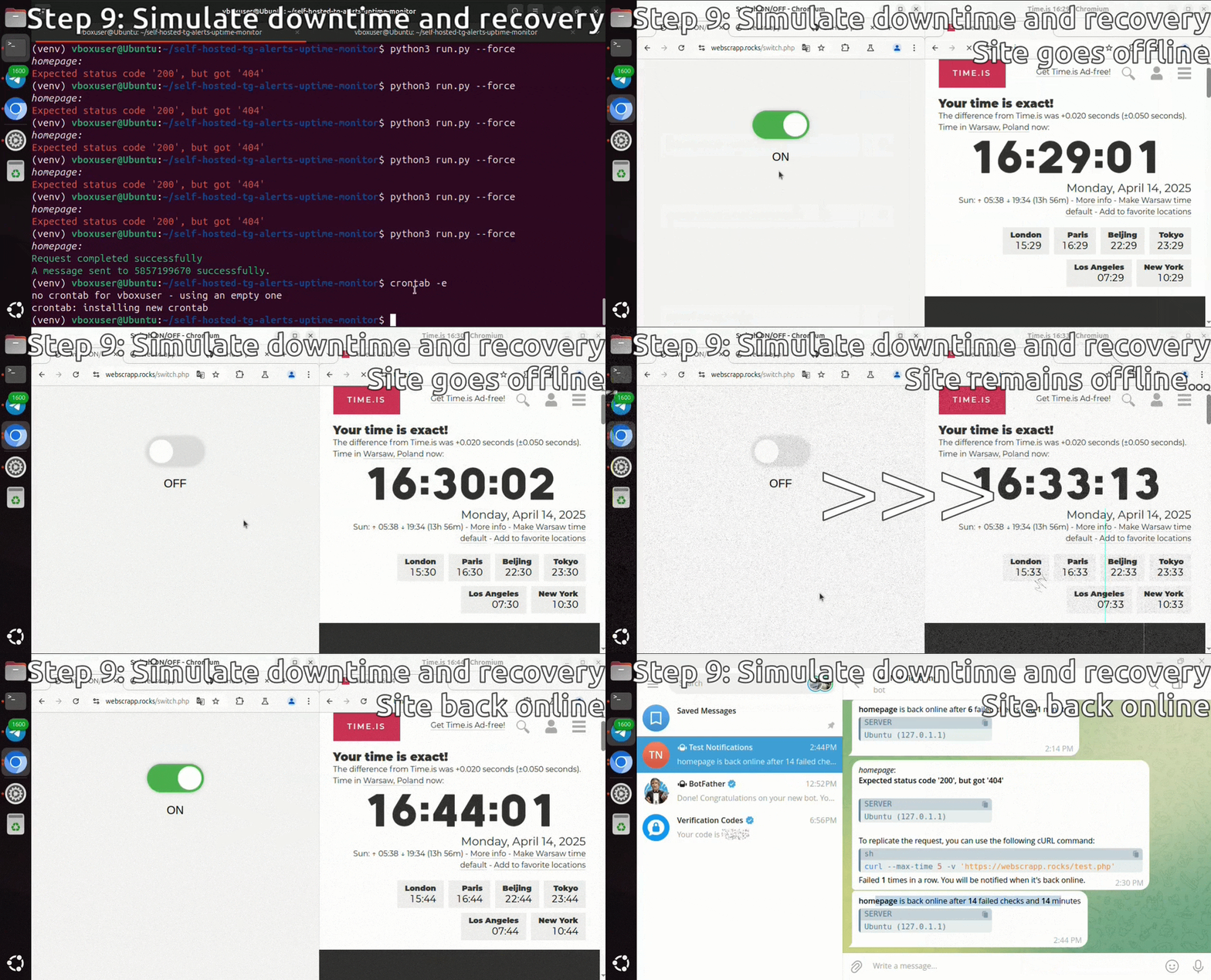
- 🚨 One alert after N consecutive failures (no spam or duplicate messages)
- 🔁 Continues checking once a minute during downtime (ignoring the original schedule temporarily)
- ✅ "Back online" message sent when site recovers, with:
- Duration of downtime (in minutes)
- Number of failed checks
- 📆 After recovery, monitoring returns to your custom schedule — fully automated.
- 📅 Scheduled Summaries: Configure periodic summary reports using cron syntax
- 🎯 Smart Filtering: Summaries are only sent when there are actually failing services
- 📋 Comprehensive Overview: Shows all services currently down with error details and duration
- 📢 Broadcast Delivery: Sent to all unique chat IDs from your monitored sites
Found a bug? Want a new feature? Open an issue or submit a PR!